
How Scan2x Actually Works: From Document Capture to Intelligent Automation
Every day, organisations receive and process documents in different formats and from multiple sources. Some arrive on paper, while others are already digital, coming through emails, electronic files, online platforms or other business systems.
Regardless of how they arrive, the challenge remains the same: how do you turn documents and the information they contain into accurate, structured and usable business data without relying on time-consuming manual processes?
This is where Scan2x comes in.
Scan2x is an intelligent document capture and processing solution designed to handle both physical and digital documents. It captures information, extracts relevant data, applies predefined business rules and workflows, and delivers documents and information to the systems where they are needed.
While the technology behind these processes can be complex, Scan2x is designed to make the experience simple for the people using it.
In fact, one of the easiest ways to understand this simplicity is through an analogy often used to describe Scan2x: using it can be as straightforward as using an ATM.
For someone capturing a physical document, the experience can be summarised in four simple steps:
Authenticate. Select the job. Capture the document. Walk away.
But what if the document is already digital?
The principle remains the same: the complexity is handled behind the scenes. Digital documents can enter Scan2x by being uploaded or dropped into Scan2x or through configured input channels, such as email or watched folders, allowing processing to begin without someone having to physically scan a document.
Whether the document originates on paper or arrives digitally, Scan2x applies the configured processing rules to turn it into usable business information.
So, how does it all work?
One solution, multiple document sources
Document processing is no longer limited to scanning paper documents.
Businesses receive invoices as PDF attachments, contracts as electronic files, forms through digital channels and countless other documents that never exist in physical form.
At the same time, paper documents remain part of everyday operations across many industries.
Scan2x is designed to accommodate both.
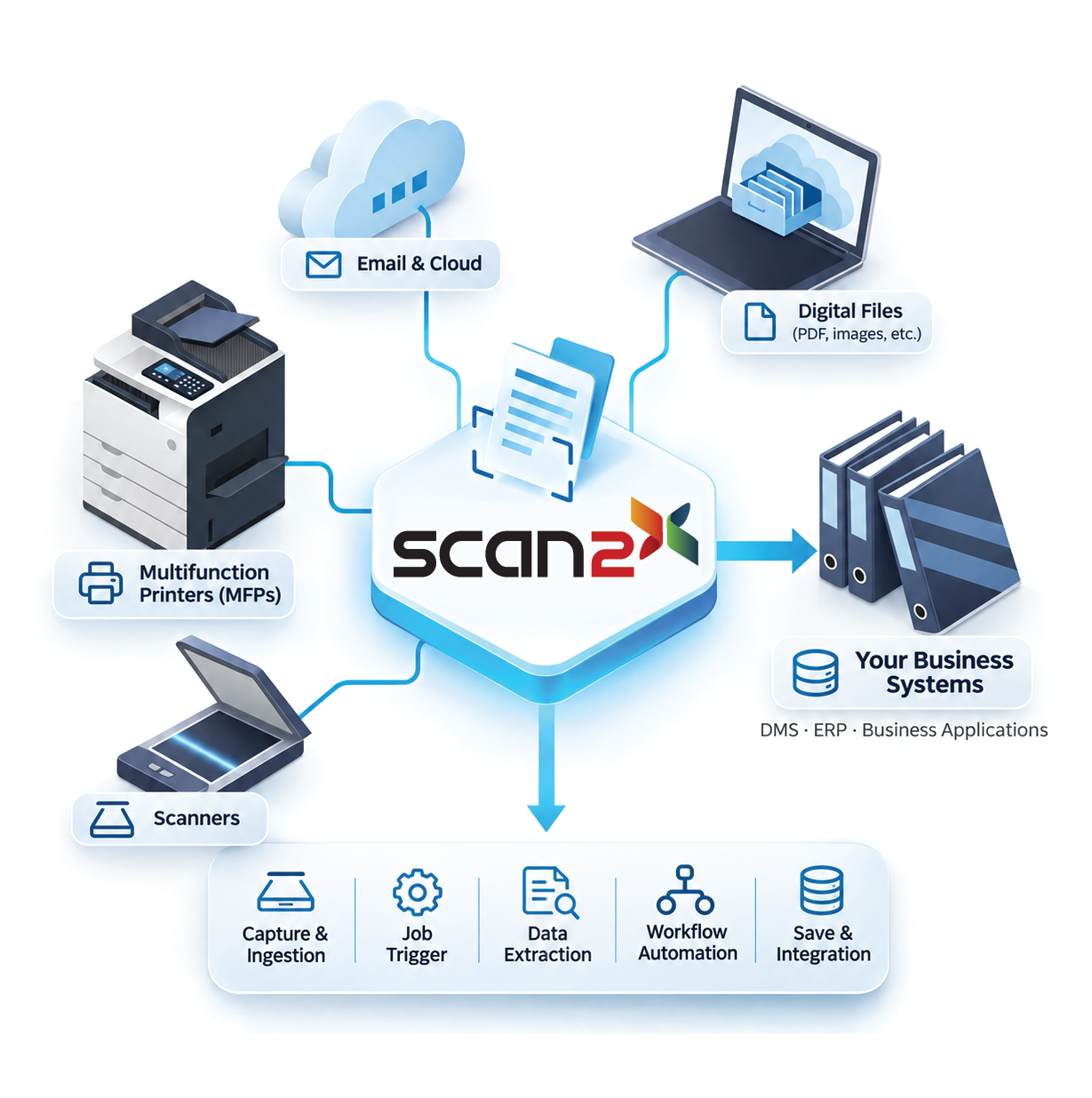
Documents can enter the system through a range of supported sources, including multifunction printers (MFPs), standalone scanners, mobile devices, web interfaces, emails, watched folders and other configured digital inputs.
This flexibility means organisations do not need to treat physical and digital documents as entirely separate processes.
For example, an invoice received by email and a paper invoice captured through a scanner may both need the same information extracted, validated and transferred to an accounting or document management system.
With Scan2x, both can be processed according to the relevant configured Jobs and business rules.
This flexibility is particularly valuable for organisations handling different document types across multiple departments and industries. Discover how intelligent document processing supports different industries and business requirements.
The end-user experience: simplicity without the complexity
One of Scan2x’s main strengths is its ability to simplify document processing for end-users.
The person submitting or capturing a document should not need to understand the technologies, integrations or business rules involved in processing it.
Instead, these requirements are configured in advance by an administrator.
For physical document capture, this can be as simple as approaching a multifunction printer or scanner, authenticating, selecting the appropriate Job and capturing the document. For digital documents the user can upload the file or files from his computer or phone. Many different file formats are supported from images to PDFs and beyond.
This is where the ATM analogy becomes particularly relevant.
When using an ATM, you authenticate, select the operation you want to perform and complete the transaction. You do not need to understand the systems, security checks or processes happening behind the scenes.
Scan2x follows a similar principle.
The end-user focuses on the task. Scan2x handles the configured process.
However, this simplicity is not limited to physical scanning.
When documents are already digital, they can enter Scan2x through configured digital input channels. For example, a document arriving in a monitored email inbox or watched folder can be picked up and processed according to the configured workflow, without requiring someone to manually scan or upload it.
In both scenarios, the objective is the same: reduce unnecessary manual decisions and ensure documents are handled consistently.
Depending on the Job configuration, certain processes may still require user input or validation, but the underlying rules and processing steps are already defined.
What happens behind the scenes?
Whether a document is scanned from paper or received as a digital file, Scan2x can process it through a series of predefined steps.
These steps are configured by the administrator according to the organisation’s requirements.
At its core, the process can be broken down into five main stages:
- Capture & Ingestion
The process begins when a document enters Scan2x.
For physical documents, this may involve scanning through an MFP, standalone scanner or supported mobile capture method.
For digital documents, it may involve receiving files through email, a watched folder or another supported input channel.
The important distinction is that a document does not need to be printed and scanned to be processed by Scan2x.
A PDF invoice received by email, for example, can enter the processing workflow directly as a digital document.
By accommodating multiple document sources, Scan2x helps organisations bring physical and digital information into a more consistent processing environment.
However, receiving a document is only the beginning. The quality and structure of the information extracted from it can affect every subsequent process. This is why intelligent capture plays an important role in creating clean, reliable business data.
- Job Trigger
Once a document enters Scan2x, the appropriate configured Job determines how it should be processed.
For an interactive capture process, an end-user may select the relevant Job.
For digital documents arriving through configured input channels, processing can be initiated according to the rules associated with that input.
This is one of the key principles behind Scan2x:
The administrator defines the process. Scan2x applies it to the document.
A Job contains the relevant configuration for processing a document, including the extraction methods, required metadata, validation rules, processing steps and destinations.
Depending on the requirements, the administrator can configure technologies such as barcode recognition, OCR, AI and other available extraction methods.
This allows different document types to follow the processes appropriate to them, regardless of whether they originated as physical or digital documents.
- Data Extraction
Once the document has entered the relevant process, Scan2x extracts the information required by the organisation.
Depending on the Job configuration, this may involve recognising barcodes, reading text through OCR, extracting information using AI or combining different extraction methods.
For example, an invoice received as a PDF attachment may contain information such as the supplier name, invoice number, date, total amount and other relevant fields.
Rather than requiring an employee to manually enter that information into another system, Scan2x can extract the required data according to the configured Job.
The same principle can apply to a paper invoice that has been scanned.
The document’s original format or source does not have to determine how its information is used.
AI can be particularly valuable when organisations handle documents with different layouts and structures. Combined with appropriate validation and processing rules, it can help reduce manual data entry and improve efficiency.
To explore this further, read about how AI-driven document processing can reduce manual errors and improve business processes.
- Workflow Automation
Extracting information is only part of the process.
The real value comes from what happens next.
Once the required information has been identified, Scan2x can apply configured workflows and business rules to determine how the document and its data should be handled.
Depending on the Job, this can include document classification, data mapping, validation, business-rule processing and cross-checking information against external systems.
For example, information extracted from a digital or scanned invoice may need to be checked against existing supplier records before it is transferred to another business application.
The administrator defines these rules in advance, allowing Scan2x to perform the configured steps automatically where appropriate.
Some workflows may also include user review or validation when required.
This is an important distinction: Scan2x is not simply about extracting information from documents. It is about making that information usable within a wider business process.
By combining intelligent extraction with validation, workflow automation and integration, organisations can move beyond isolated document-processing tasks towards more connected operations.
- Save & Integration
The final stage involves saving or transferring the processed document and its metadata to the appropriate destination.
Depending on the configuration, this could include a document management system, a folder, an email destination, a database, a web service or another supported business application.
For example, once an invoice has been processed and the relevant information extracted, the document can be stored in a document management system while its metadata is made available for searching, retrieval or use in other business processes.
This applies whether the original invoice arrived on paper or as a digital file.
The objective is to ensure that documents and the information they contain are available where they are needed, rather than remaining isolated in email inboxes, folders or disconnected systems.
This is also where intelligent capture becomes an important part of a wider document management strategy. Discover how Scan2x and Therefore™ DMS can help optimise document management, from capture and processing to storage and retrieval.
Beyond Jobs: centralised administration and control
Configuring individual Jobs is only one part of the administrator’s role.
Administrators can also manage the wider Scan2x environment, including licences, users, devices, access controls and integrations with third-party solutions.
This provides a centralised approach to managing how documents are received, captured, processed and delivered across the organisation.
Rather than requiring different departments or users to make individual decisions about document handling, organisations can establish consistent processes that apply to the relevant document types and input channels.
Centralised administration also supports greater visibility and accountability.
With auditing and access controls, organisations can maintain oversight of document-processing activities and help ensure that information is handled according to their requirements.
This becomes especially important when documents are entering the organisation through multiple channels.
Whether information arrives through an email attachment, a scanned paper document or another supported digital input, the organisation can apply the appropriate controls and processing rules.
From documents to usable business information
The real value of Scan2x lies in its ability to simplify and automate the way organisations handle documents, regardless of where those documents originate.
For an employee capturing a paper document, the experience can be as straightforward as using an ATM:
Authenticate. Select the job. Capture the document. Walk away.
For documents already in digital form, configured input channels can initiate processing without requiring a physical scan.
In both cases, the intelligence happens behind the scenes.
Scan2x extracts information, applies business rules, supports validation, automates workflows and connects documents and data with the systems that need them.
Because intelligent document processing is not just about scanning documents. It is about turning information, whether physical or digital, into something your business can actually use.